F5 BIG-IP visibility and change tracking

Your F5 estate.
Change history.
One clear view.

RadOptix for F5 brings service configurations, dependencies and snapshot-based change history into one searchable view.

On-premises. Read-only collection. Your data stays with you.

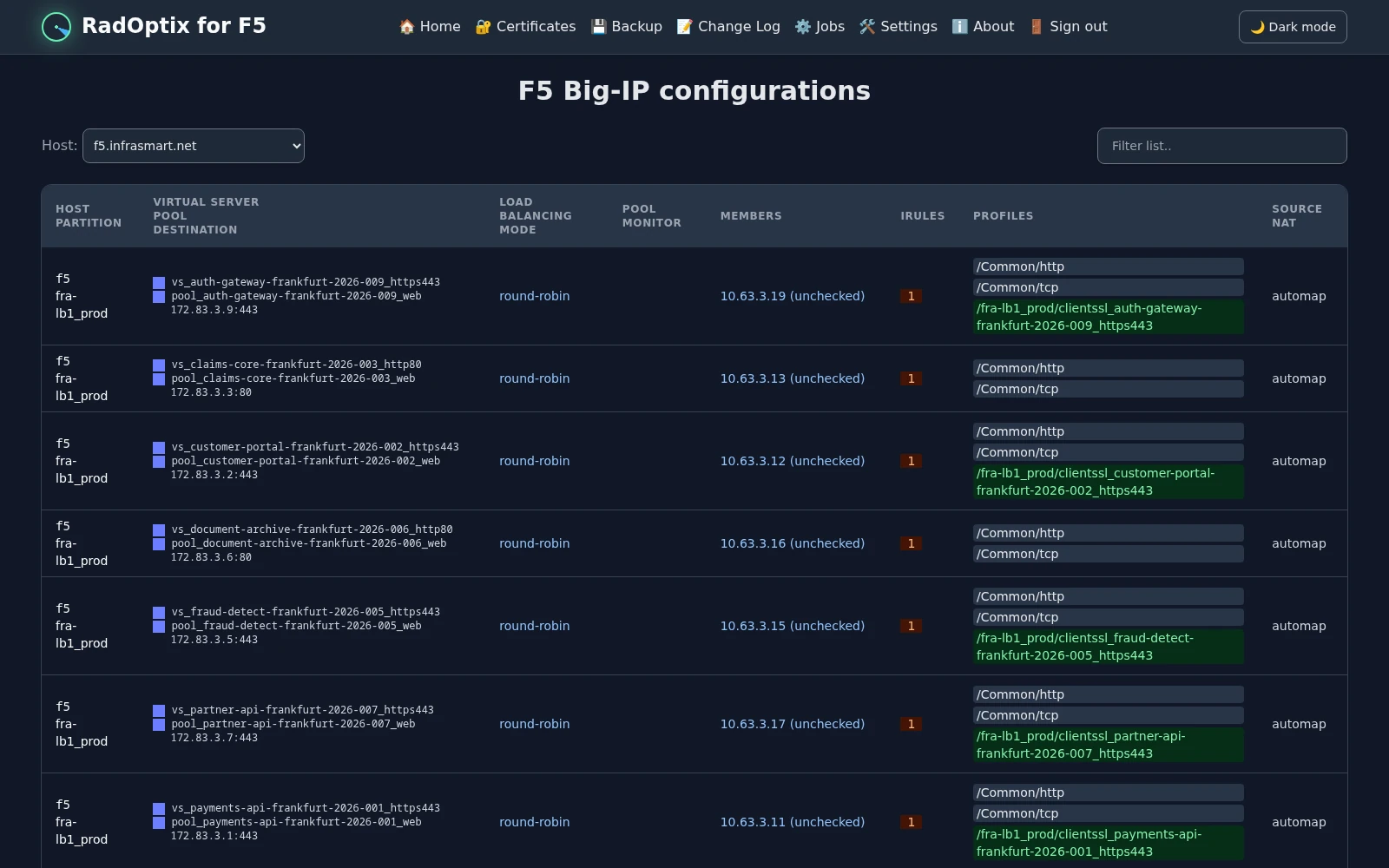
RadOptix for F5 service overview showing virtual servers, pools, destinations, members, iRules and profiles using demo data.
Service configuration and dependencies, using demo data. Click to enlarge.
Built for F5 operators Multi-device BIG-IP estates Service dependencies Snapshot-based change history Read-only data collection On-premises deployment

What is RadOptix for F5?

A unified view across your F5 estate

Trace a virtual server to its pools, members, profiles and iRules without piecing together information from individual devices.

Scheduled snapshots collect configuration and status from your connected BIG-IP systems. Use the service overview to explore dependencies and the change log to investigate detected differences.

Visibility without configuration changes: data collection requires only read-only access to BIG-IP.

Why use a shared view?
App VS Pool Cert iRule
Which pool does this virtual server use?
What changed between snapshots?
Which certificates expire next?
What status was collected for this pool member?
Which virtual servers depend on this object?
What were the previous configuration values?

Why RadOptix for F5?

Less device hopping. More context for each investigation.

During incidents, maintenance windows and audits, start with the service configuration, its dependencies and the changes detected in collected data.

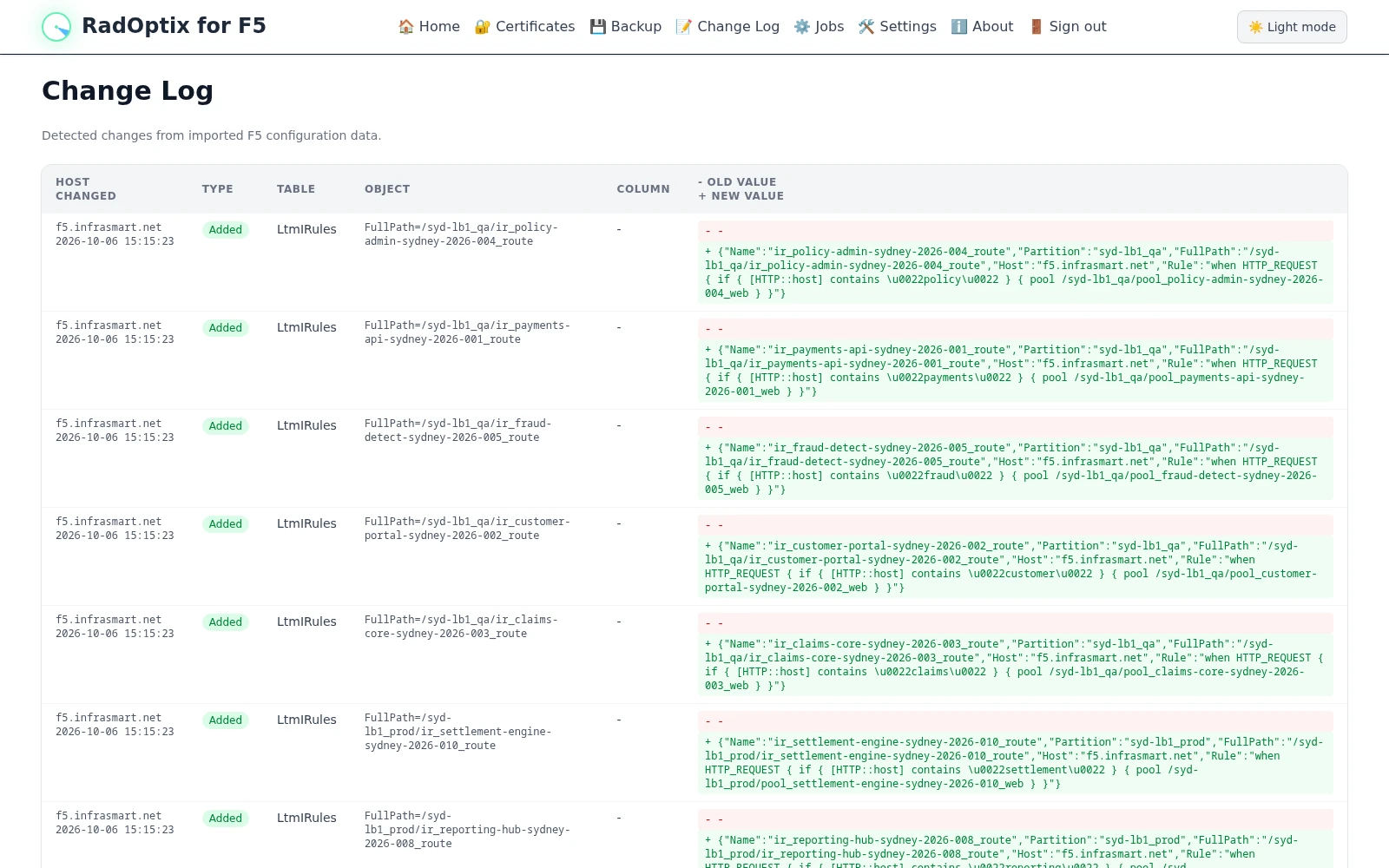
Investigating an unexpected service change? Review the affected objects and their old and new values in the change log.

Planning certificate renewals? Review certificates by expiry date and inspect the related service configuration.

Back to the product overview

For daily F5 operations

Explore services. Review changes. Plan renewals.

01

Service visibility

Trace the configuration behind a service.

Explore virtual servers, pools, members, profiles and iRules across connected BIG-IP systems. See how the objects relate before troubleshooting or planning a change.

02

Configuration history

Review what changed in collected data.

Inspect detected additions, updates and removals, including old and new values. Follow configuration changes over successive snapshots rather than relying on memory or manual notes.

03

Certificate visibility

Make upcoming renewals easier to plan.

Review collected certificates by expiration date, with days remaining and certificate details. Filter by host to focus on the part of the environment you maintain.

How it works

From read-only collection to useful history

  1. Collect

    Connect to BIG-IP management interfaces with read-only access. Collect configuration and status at configurable intervals.

  2. Explore

    Search the collected data and follow service dependencies across connected devices from a shared overview.

  3. Compare

    Review differences detected between snapshots, including the objects and configuration values that changed.

Snapshot history, not a real-time event feed. Timestamps indicate when a change was detected in collected data, not necessarily when it was made on BIG-IP.

Deployment and access

Inside your network. Under your control.

Deployed inside your environment. Your F5 configuration data stays under your control.

Run the containerized application on-premises or in your private cloud. Collection uses read-only access to BIG-IP management interfaces; it does not require permission to change device configuration.

No SaaS dependency Read-only BIG-IP access Configurable collection intervals Configuration data stays in your network
Your infrastructure On-premises / private cloud
RadOptix for F5 Read-only collection, search and snapshot history

Demo access on request

See RadOptix for F5 in action

Try service searches, inspect dependencies and review configuration history in an environment populated with demo data.

A login is required. Email us to request demo credentials before opening the environment.

RadOptix for F5 change log showing detected configuration changes, object names, timestamps and old and new values using demo data.
Configuration changes detected in imported demo data. Click to enlarge.

Take a closer look

See how it fits your F5 environment

Contact Infrasmart AS to discuss deployment and customer-specific requirements. Tell us about your environment and what you need.

hello@radoptix.io